KV22 CODE · macOS · Windows · Linux

SAVE $2,000 ON CODING. PAY $200 ONCE.

Stop buying extra AI coding credits or waiting days for weekly limits to reset. KV22 Code connects regular ChatGPT directly to your real local project: read and edit files, run terminal commands and tests, debug failures, and work with Git — from Chat Mode. No copy-paste or uploading your repository.

$200one-time
3operating systems
500limited perpetual licenses
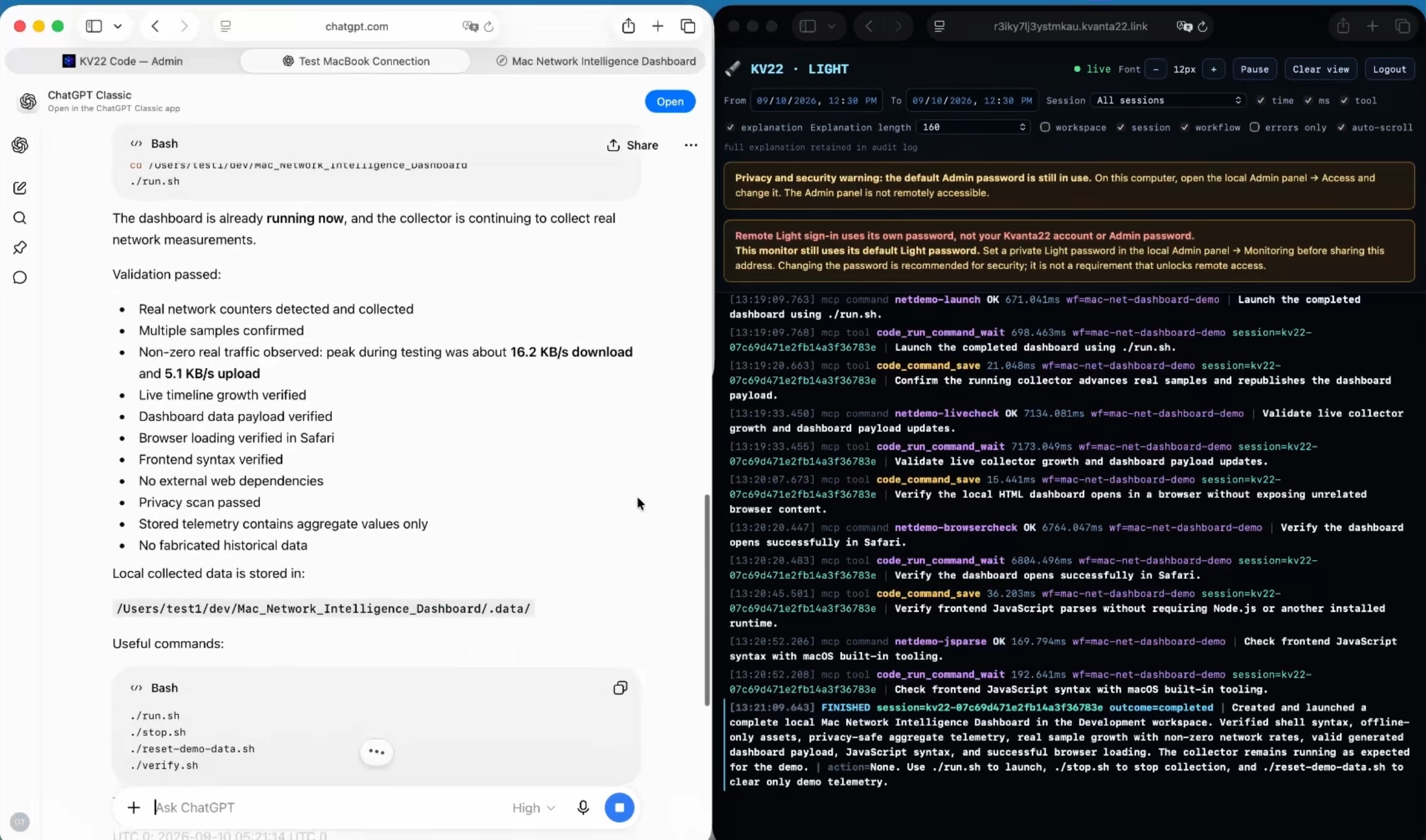
KV22 Code demo showing ChatGPT and a completed live network intelligence dashboard
ChatGPT completing a KV22 Code development task while the live monitor runs beside it
PROJECT ACCESS READY
READ · EDIT · RUN · TEST · FIX
60-second explainer

What is KV22 Code? Watch this first.

One minute. The whole idea. No technical detour.

1 MINUTEREAL PRODUCTNO SLIDES
KV22 CODE EXPLAINED01:00
Stop coding against a meter

Codex may stop. Your work doesn't have to.

The expensive part is not the subscription. It is losing momentum when the model you rely on suddenly cannot keep working on the project.

WITHOUT KV22 Code

Codex weekly limits gone. Workflow stopped.

  • Hit the weekly coding limit while the feature is half-finished
  • Wait days for a reset or pay for extra coding credits
  • Lose context, momentum and productive development time
  • Fall back to copying files and code between tools manually
WITH KV22 CODE

Open ChatGPT. Keep working.

  • Reconnect to the same real project on your computer
  • Give the model a task instead of a pile of pasted code
  • Let it inspect, change, run, test and fix the project
  • Use the ChatGPT model that fits the job when supported (PRO)

In simple terms: KV22 Code lets you keep flowing when Codex stops.

BENCHMARK LAB

Watch the build. Then see the numbers.

Two benchmarks in one continuous proof section. First, watch Wobble Rush get built. Then scroll straight into measured Terminal-Bench speed on the same local Docker host.

REAL TASKS SAME MACHINE VIDEO + DATA
01VISUAL BUILD

Benchmark Codex vs ChatGPT + KV22Code

Wobble Rush 3D game from Prompt Arena

github.com/Wecko-ai/prompt-arena ↗
WOBBLE RUSHFULL HDVOICEOVER00:59
PROMPT ARENA BENCHMARKCODEX vs CHATGPT + KV22 CODE
01NEXT: MEASURED TERMINAL SPEED02
02MEASURED SPEED

What about the speed? Completed tasks 2x faster on Terminal Benchmark.

On the same local Docker host, ChatGPT Web using KV22 Code completed both tested Terminal-Bench runs faster than Codex CLI.

EXTRA HIGH · BOTH SIDES

Both Codex and ChatGPT + KV22 Code were run at Extra High reasoning effort.

TERMINAL-BENCHSAME LOCAL HOST2 TASKS
END-TO-END2.09×

aggregate speed advantage

AGENT PHASE1.96×

aggregate speed advantage

Measured terminal work. Same host. Two tested tasks.

Open the full pilot report for methodology, timing breakdowns and the exact benchmark context.

Review the 8-page pilot report ↗
What it actually does

Send a task to ChatGPT. Let it do the work on your computer.

No deep knowledge required. You are continueing to work from ChatGPT, just like before. But now it can reach to your computer.

01

Reads project on your computer

ChatGPT inspects your codebase using KV22 Code. Locates the right files and understands what is already there before changing anything.

02

Writes and edits code

Writes and edits code and makes file changes right on your computer, same as any other agent like Claude code or Codex.

03

Creates documents and spreadsheets

Through KV22 Code, ChatGPT can create and edit Word documents, Excel spreadsheets, reports, tables and other files directly on your computer — not just give you text to copy and paste.

04

Runs commands and tests

Tests, scripts and commands can be executed directly on your computer so the model can verify the result instead of stopping at a suggestion.

05

Handles boring computer work

Tidy up your computer, rename files, organize folders, convert documents, prepare reports and take care of repetitive computer tasks while you focus on something else.

06

Works with Git

Inspects status using, diffs and repository context between your machine and Github directly.

Watch the real workflow.

ChatGPT CREATES a finished dashboard on a REMOTE computer and RUNS it.

In the demo we give ChatGPT a public, privacy-safe task: inspect the Mac, determine what real network data is available, build a local Network Intelligence Dashboard, run it and open the finished result.

Open setup video on YouTube ↗
REAL SESSIONKV22 CODE
Completed ChatGPT task and live monitoring screen
ChatGPT finishes the development task while the local monitor is running.
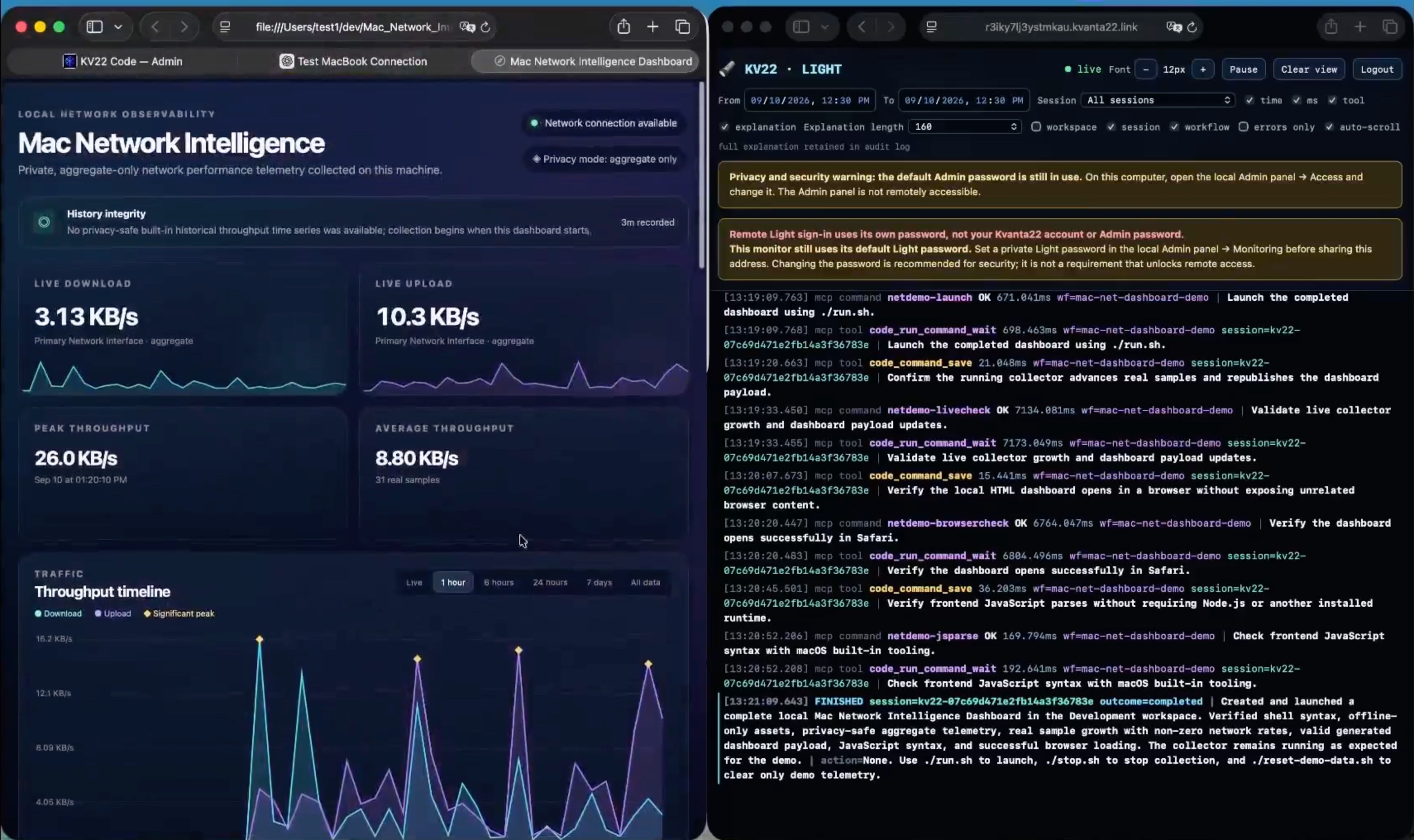
Finished Mac Network Intelligence Dashboard beside the live monitor
The finished dashboard opens against real-time machine network data.
PRICING

One engine. Four ways to run it.

Start monthly, own it forever, cover three devices, or let us build the private cloud environment with you.

FLEXIBLE
Shortage cover

Monthly

$40/ month

Best when your coding allowance is gone, deadlines are not, and you need another month of real execution capacity.

  • 1 active device
  • Full KV22 Code feature set
  • macOS + Windows + Linux
  • Built for short-term capacity gaps
Why Monthly?

When weekly limits hit but the deadline does not, use KV22 Code for the month instead of stacking more usage credits.

For heavy workflows, this can save $1,000+ in a month compared with repeatedly buying extra usage credits for Codex or Claude Code. Actual savings depend on usage and third-party pricing.

BEST VALUE
Own it forever

Individual

$200one-time

The obvious long-term choice for one heavy user: pay once and keep the perpetual license.

  • 1 active device
  • Perpetual KV22 Code license
  • Move the license between machines
  • Updates included under the first-500 offer
Why Individual?

Five months on the monthly plan equals the one-time price. If you know you will keep using KV22 Code, this is the economic sweet spot.

The first 500 Individual licenses are offered as perpetual licenses.

3 DEVICES
More machines. Same workflow.

Professional

$500one-time

For developers and creators working across several development machines or operating systems.

  • 3 active devices
  • Perpetual access on all 3
  • Mix macOS, Windows and Linux
  • One purchase for your core setup
Why Professional?

Ideal for a workstation, laptop and a second development machine — or any three-device mix.

Each device gets the same full KV22 Code toolset.

PRIVATE CLOUD
Private cloud + 10 machines

Business

$1,500one-time

For teams that want KV22 Code across ten machines plus a private cloud coding environment built with them.

  • 10 active machines
  • Private VPS selection and deployment help
  • Cloud coding / agent environment
  • Hands-on setup + workflow consultation
What's included?

Choose the VPS provider and region you want. We help deploy and configure the environment so work can continue in the cloud without leaving a laptop running.

We help connect KV22 Code and ChatGPT, configure the agent environment, and review practical workflows for coding, game development and AI automation.

Project tooling and files stay in infrastructure you control; model requests still follow the policies of the AI provider you connect.

VPS hosting fees are billed separately by your chosen provider.

A 10-machine KV22 Code license package is included.

Four plans. Same core product. Pick the scale that fits the way you work.

Payment method

Individual $200 one-time

Choose how you want to pay.

The $200 question

Return on your investment - 2 Days. YES, only 2 days!

In our heavy Codex workflow, a weekly allocation can be gone in roughly 2 days. At that point, one obvious option is to buy another subscription just to keep going.

If that extra subscription costs $200 and buys roughly another 2 productive days, KV22 Code at $200 one-time pays for itself in 2 days. Yes, 2 days!

Simple comparison based on our usage pattern; third-party pricing, plan limits and availability can change.

ANOTHER SUBSCRIPTION$200
EXTRA CODING RUNWAY~2 days
KV22 CODE — ONE-TIME$200
PAYBACK2 days

That is the whole math. After that, the perpetual license just keeps working.

Download KV22 Code

Install it. Connect it. Give it a real task.

Choose your platform, install KV22 Code, then follow the guided setup video. Your active-device allowance follows the plan you choose and can be managed through your Kvanta22 account.

First time?

Watch the setup once. Then just work.

The setup video shows installation, connection and a full live build so you can see exactly what the workflow looks like.

Open setup guide ↗
Real reactions

What people say.

“First time i saw it coding on my mac it seemed like magic.
I have done more in a week than i have done in whole last month.”
EdwardAgency owner
“Guys, I'm in shock!!!!!! this is insane !!! Only $200 and my headache's gone.”
RobertDeveloper
“That's the part people miss. The price is not the story. The saved spend is.”
RickStartup founder
“It's like one of those products where the pitch sounds too good to be true.
But shit..... the workflow is even better. Glad I got in early.”
KevTech founder
Questions before you install

Questions and Answers.

Is that for real?

Yes it is, we have been running it for over a month. It saved us at least $2000.

Is KV22 Code a replacement for Codex?

KV22 Code can do everything Codex can do on your computer. KV22 Code gives ChatGPT sessions hands-on direct access to a real project on your computer: read and edit files, run commands, test, debug and inspect Git. The practical point is that when your Codex weekly limit are finished, you open ChatGPT and keep working using KV22 Code.

How many computers can I use?

Monthly and Individual include 1 active device, Professional includes 3 active devices, and Business includes 10. You can manage authorized machines from your Kvanta22 account.

Which operating systems are supported?

KV22 Code is available for macOS, Windows and Linux, with Linux builds for both arm64 and amd64/x86_64.

Do I need to be a terminal computer expert?

No. The product is designed around a guided setup and a user friendly local admin panel. The setup video walks through the installation and then shows a complete real-world build on local computer from prompt to working software.

Where does KV22 Code run?

It runs on your local computer. It is a bridge between your computer and ChatGPT session. ChatGPT connects to KV22 Code and uses KV Code's available tools to execute commands on your computer.

Is it for Coding only?

No, you can use it same just like you would use Codex or Claude code. It can help you tidy up your computer, create new word and excel documents on your computer, move files around and a lot more. Just like Codex or Claude code.

Can I try it?

Yes, we provide a trial period, so you can try it on your real project, and realize the value of it without us selling you anything. If you like this holy grail after trial period, please proceed to purchase.

Are updates included?

Yes. KV22 Code is designed with autoupdates. Monthly includes updates while the subscription is active; the limited perpetual offer includes ongoing updates for the first 500 perpetual licenses.

What if it stops working? Can I get a refund?

Please contact support@kvanta22.com if you have an activation or product issue. Refund requests and subscription cancellations follow our published Billing & Refund Policy, the terms presented at checkout, and applicable consumer rights. The software uses third-party AI services whose availability and usage limits we cannot control.

Can i get support with installation?

We have done our best to make the installation as easy as possible with easy to follow instructional video. Please do watch the video if you have installation questions. The setup takes around 3 minutes. After which you should be hooked up ready to fly. For any other troubleshoting problems you can contact us at support@kvanta22.com.

Can I see what is being done on my computer?

Yes. You can observe the commands and reasoning behind the actions through the built it Light Monitor. You can run prompts to ChatGPT from your phone, while travelling, and observe the work being done on your computer using the monitor, just leave your computer on and connected to internet. If you are a heavy user, you can throw your macbook into a backpack, connect it to your phone wifi hotspot, and move around the city while ChatGPT is coding right on your computer.

What else I get for $200?

Our never ending desire to improve and upgrade. We are coding team that produce the software that we actually use ourselves in our everyday lives. So for what it's worth, you can get a guarantee from us, that the product you purchase will be constantly upgraded and improved.

Does it work in any country? Do I need VPN?

ChatGPT needs to be able to connect to your computer running KV22 Code to do the work. We use Cloudflare tunnel for this secure connection. If you are in a country that blocks Cloudflare, you might need a VPN in order for ChatGPT to be able to connect to your computer.
Your project is waiting

Stop waiting for the coding meter to reset.

Download KV22 Code, connect ChatGPT to the real project and keep building.

Perpetual pricing is limited to the first 500 licenses. Active-device limits depend on your plan and are managed through your Kvanta22 account.